Related articles
🍪⚒️ Equipping your Rails observability: the dashboard that never existed

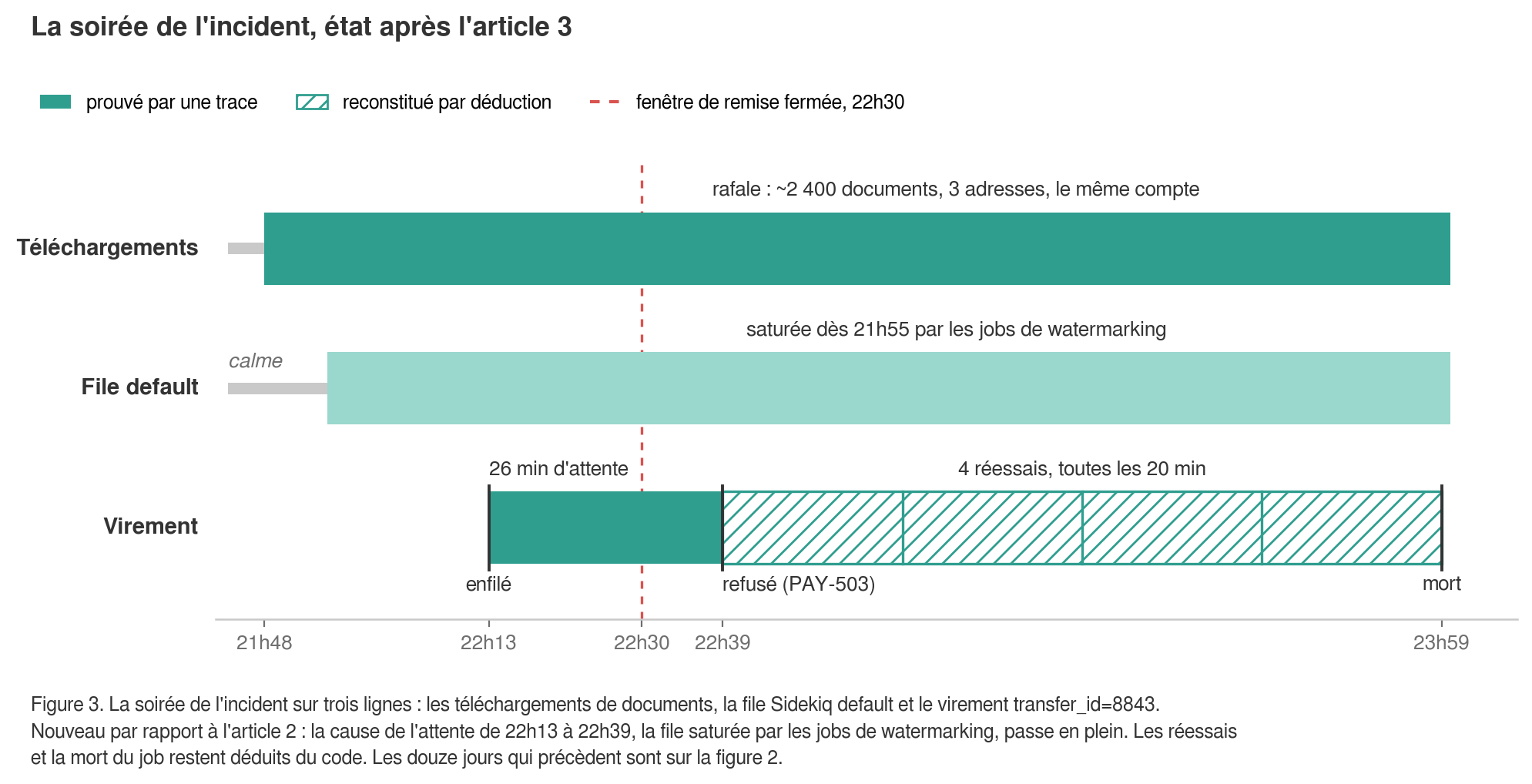
Where does the investigation stand? One Tuesday evening, a €15,000 transfer vanished on an investment platform: validated at 10:13 PM, it never reached the provider, stuck in the database with a status of processing. Article 2 showed why there was no trace of its death and how to log it so it exists next time. Since then, the investigation has moved forward: the job executed at 10:39 PM, twenty-six minutes after it was queued. Two questions remain open. Why this delay? And what were those GET /documents doing in such abnormal volumes at the same time?
This series follows the same incident as a common thread throughout the techniques discussed. The " ⏪ What you would have seen" boxes show the log lines or screens that the right tools would have produced that night, which never existed due to a lack of preparation. You can skip them: the rest reads like a standalone tutorial.
Manual reconstruction: what the file is willing to give up
Without tools, the investigation is done with whatever is lying around: the database, the nginx access logs, the raw Rails log, and Redis.
Latency, first. The transfers table has a created_at (transfer validation) and an updated_at (last state change, in practice the transition to sent). For our transfer, the delta shows nothing: it remained in processing, it never changed state. For the other transfers that evening, which eventually went through, it reveals something: between 10 p.m. and 11 p.m., they all took twenty to forty minutes to move to sent, compared to a few seconds the day before. All the jobs that evening were delayed in the queue, ours just like the others.
Volume, next. Nginx access logs contain every request with its path and timestamp. To get the number of document downloads per day over twelve days, you have to gather the rotated files, filter by path, extract the date, and count:
awk '$7 ~ /^\/documents\// { split($4, t, ":"); d = substr(t[1], 2); c[d]++ }
     END { for (d in c) print d, c[d] }' access.log* | sort
The command returns dates and numbers, which you paste into a spreadsheet to get a graph. Expect to spend a few hours retrieving files from each server, and accept that you will lose the lines from containers that were replaced in the meantime. And no one will be able to reproduce this chart tomorrow with a slightly different question.
Note: the $7 field assumes the default nginx combined format. With a custom format, the column number changes and the command fails silently: zero lines, no error.
Retries, finally. The job failed on its first execution. By re-reading the retry policy from article 2 in the code, we can deduce the subsequent attempts at 10:59 p.m., 11:19 p.m., and 11:39 p.m., and the job's death at 11:59 p.m. No log line confirms them. As for the Sidekiq dead set—the repository for dead jobs whose limit and eviction of older items were described in article 2—it no longer contains anything useful: lowered to 1,000 jobs by the legacy configuration, it was filled overnight by thousands of dead jobs, and the payments, having died among the first, were pushed out.
Note: the default limit is 10,000 jobs (dead_max_jobs), kept for six months (dead_timeout_in_seconds). A dead job weighs anywhere from a few hundred bytes to a few kilobytes depending on its arguments; measure how much space the dead set actually occupies in Redis before reducing it.
Four limitations emerge. You cannot count or aggregate without writing a script for every question. Logs are scattered across servers and ephemeral containers. Rotation deletes them faster than the retention period mentioned in article 2. And logs live on the very machine they are supposed to monitor.
Note (DORA): this last point also has a regulatory interpretation. Article 12 of Delegated Regulation (EU) 2024/1774 requires financial entities to implement measures protecting logging systems and logs against tampering, deletion, and unauthorized access, both at rest and in transit. This requirement falls on the regulated client and is passed down to their service provider via contract. Logs that live only on the application server go down with it, and an attacker who gains access to the machine also gains access to the traces of their activity, along with the means to erase them.
Centralization: moving logs off the machine
The application writes to its standard output, a pipe routes this stream to an external service, and that service indexes the lines so they can be queried.
A drain is a pipe that continuously copies your application's output to an external service. An agent is a small program installed on the server that performs the same task by reading files or container streams. Together, they form a log pipeline.
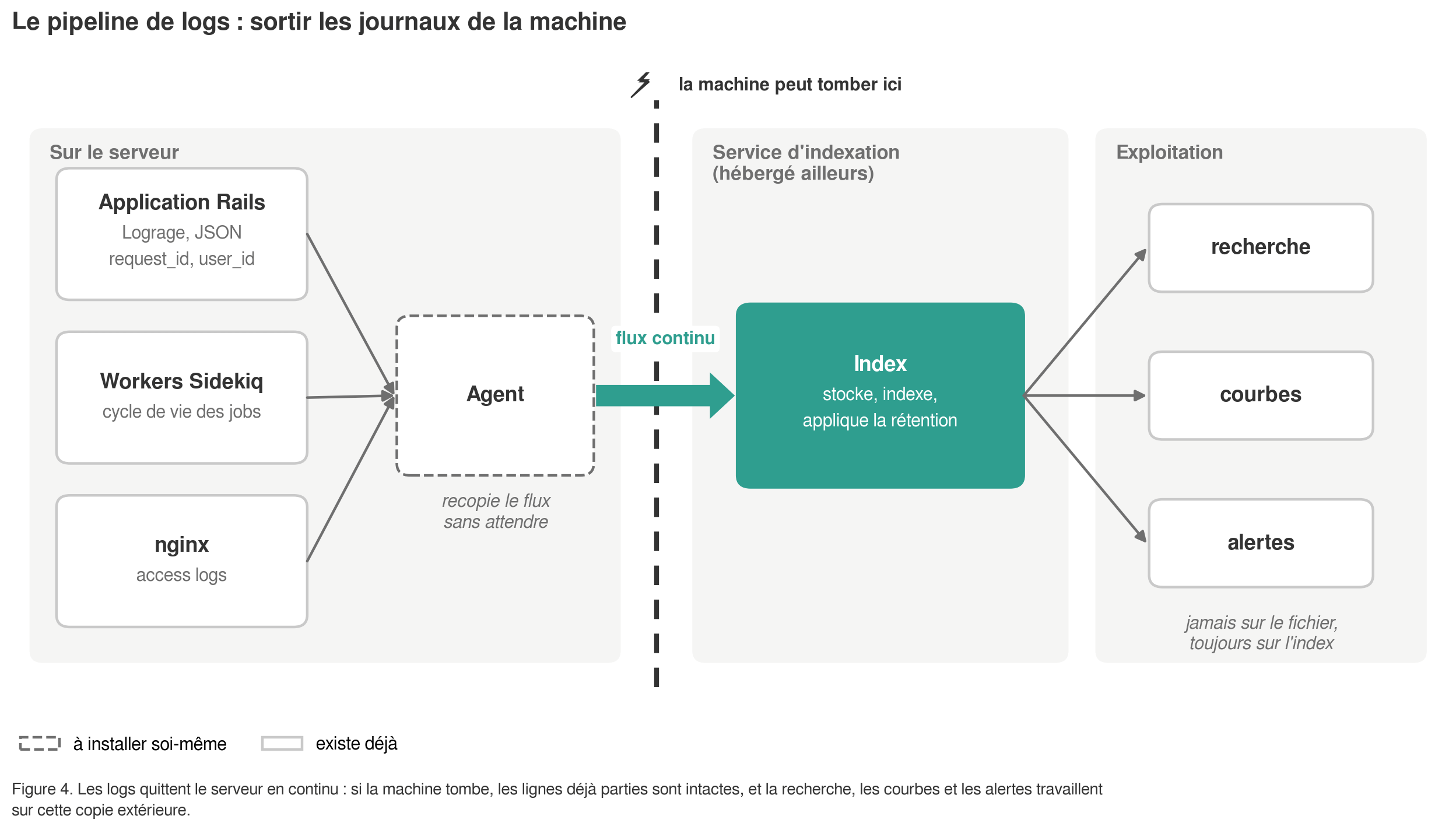
On the Rails side, there is almost nothing to do if the work from article 2 is complete: logs are in JSON format via Lograge and include request_id and user_id.
An application generated with Rails 7.2 or newer already writes to standard output in production. An older application writes to log/production.log, unless the variable RAILS_LOG_TO_STDOUT is set; to switch it, we use the same approach as the current template:
# config/environments/production.rb (template Rails 7.2 / 8.0)
config.logger = ActiveSupport::Logger.new($stdout)
  .tap { |logger| logger.formatter = ::Logger::Formatter.new }
  .then { |logger| ActiveSupport::TaggedLogging.new(logger) }
Availability, the first topic announced for this article, was actually covered in article 1 with the health check and external probe; I will not revisit it here.
Lograge writes to Rails.logger, so it follows; Sidekiq already writes to standard output. The rest is handled on the hosting side, where options fall into three categories. Solutions integrated into the host (Heroku drains to an add-on, AWS CloudWatch Logs, Google Cloud Logging) require no installation and are rarely the most user-friendly to query. Observability suites (Datadog, New Relic, Grafana Cloud, Better Stack) combine search, graphing, and alerting in one place, billed by ingested volume. Self-hosted stacks (Loki with Grafana, OpenSearch, the Elastic stack) cost operational time rather than money per gigabyte: a good trade-off above a certain volume, a bad one below it.
Note (cost): volume is the biggest line item on the bill and the primary reason for abandoning a centralization tool. Two levers: don't log what isn't needed, which refers back to article 2; and differentiate retention periods based on purpose, because debug logs have no reason to live as long as access or payment traces, which AML-CFT regulations may require to be kept for five years (see the trade-off in article 2) and for which DORA requires setting and documenting a duration based on their purpose, well beyond the six months to one year recommended by the CNIL for ordinary logs.
Note (privacy): centralizing means transmitting your logs to a processor within the meaning of the GDPR, with the corresponding contract and entry in the register of processing activities. The filtering mentioned in article 2 takes on its full meaning here, and the trap pointed out then—file names in URL paths that filter_parameters does not cover—becomes a leak of personal data to a third party.
Querying: counting, grouping, overlaying
Once logs are indexed, what used to take a morning ofawk takes a few seconds. All tools know how to do this, with different syntaxes; I will therefore describe the queries in plain English.
Counting. Filter by path starting with /documents/, group by day, count. Result: twelve days with a few dozen downloads, then several thousand on Tuesday. This is theawkcurve, obtained this time by a query that anyone can rerun.
Grouping. Same filter, group by user_id. This is where the work from article 2 pays off: without the custom_payload added user_id for each line, nginx only provided IP addresses. Three addresses in 203.0.113.0/24 lead nowhere. A user_id links each request to an account. The result for Tuesday evening: one account overwriting all the others.
Overlay. Two curves on the same timeline: the Sidekiq queue depth default (the number of pending jobs, which Sidekiq::Queue.new("default").size exposes and an agent can poll regularly) and payment latency, the delay between enqueuing and execution based on the lifecycle lines from article 2. Depth complements the latency seen in article 1: a deep queue of fast jobs is not a problem, but an old job waiting is, and the two curves together tell us which one we are looking at.
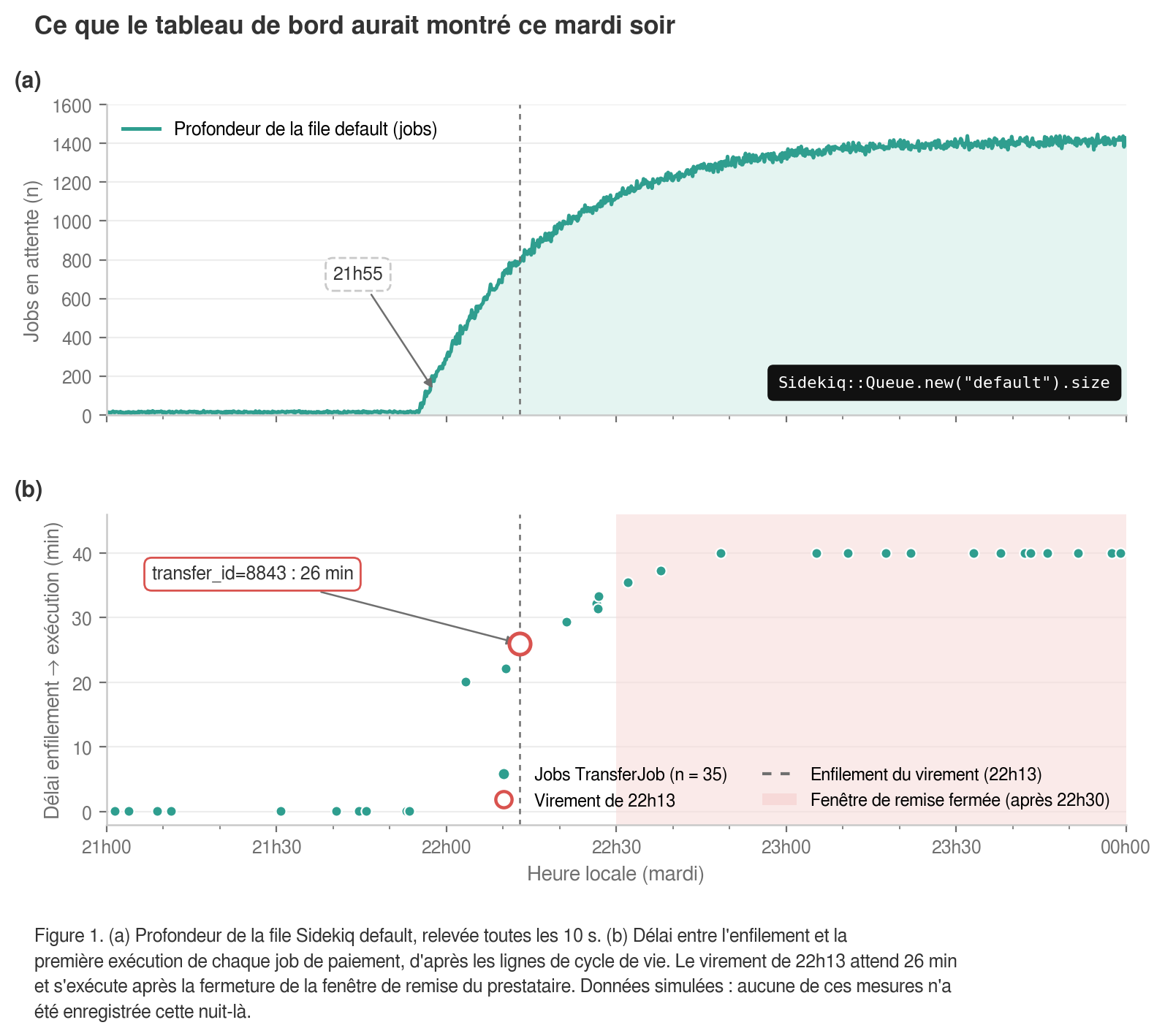
⏪ What you would have seen. Figure 1. None of this was recorded: the queue was not being measured, and no one looked at Redis until the next morning.
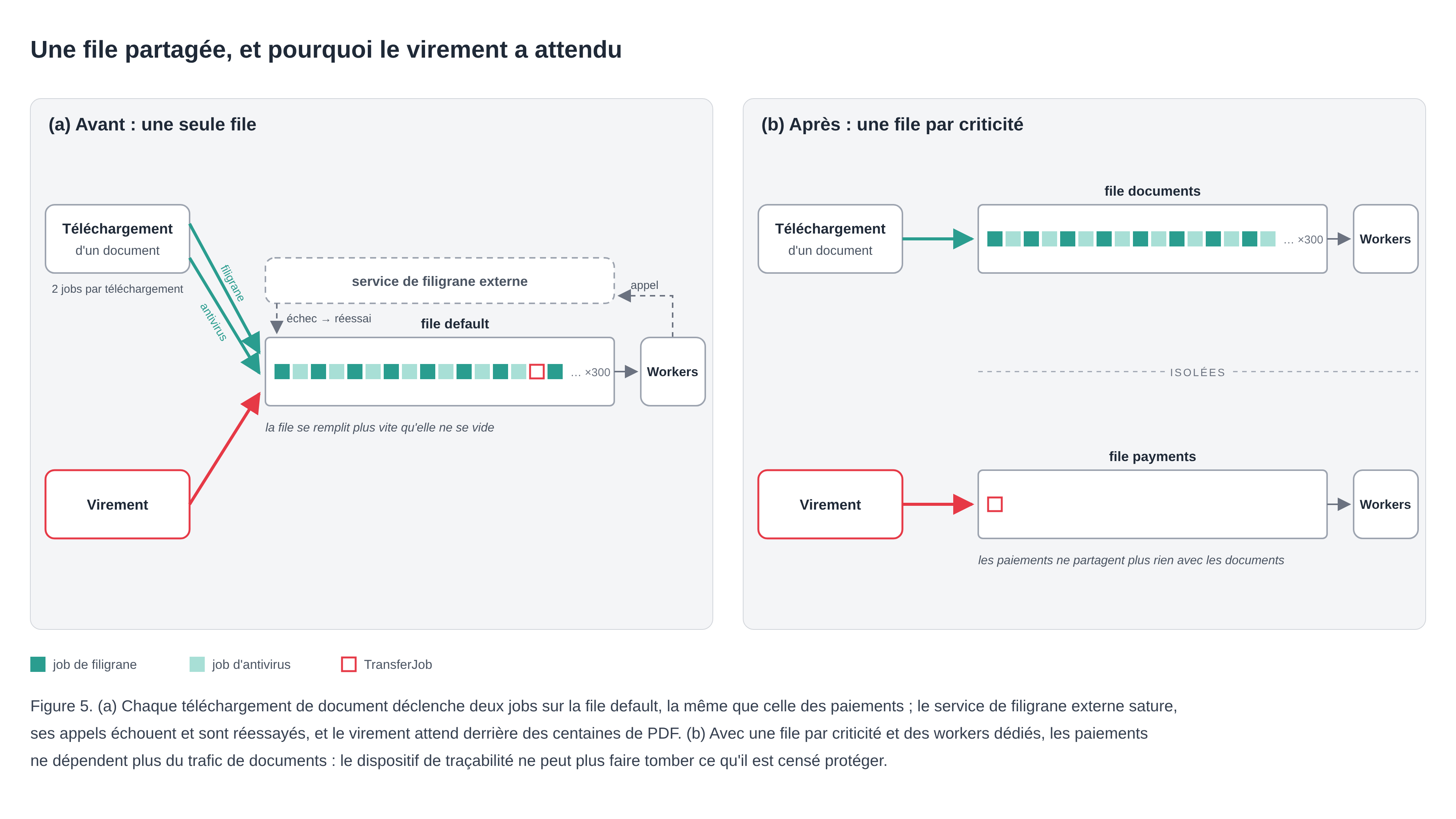
Once the two curves are side by side, the mechanics become clear. Each download triggers two jobs: a watermark on the PDF, which calls an external service, and an antivirus scan. They run on the defaultqueue. Payments do too, since TransferJob declares queue: :default. On Tuesday evening, downloads filled the queue faster than the workers (the processes that execute the jobs) could clear it; the watermarking service became saturated, its calls failed and were then retried, and the transfer sat waiting behind hundreds of PDFs. The reliability question raised in article 1 is settled.
Watermarking is used to track who downloaded what if a document ends up in the wild. It is a traceability mechanism, and it was the cause of the outage. Logging and tracking have a cost that must remain bounded, and I keep three safeguards in mind: prefer synchronous and lightweight writing (a log line, a database insertion) over one job per event; never put an external network call on the path of a trace; and isolate critical queues. The principle from article 1—that monitoring must never be able to take down what it is monitoring—also applies to traceability.
class TransferJob
  include Sidekiq::Job
  sidekiq_options queue: :payments, retry: 4
  # ...
end

class WatermarkDocumentJob
  include Sidekiq::Job
  sidekiq_options queue: :documents
  # ...
end
Note: declaring the queue is not enough; workers must consume it (using the -q option when launching Sidekiq, or in config/sidekiq.yml). Without a worker to consume it, a queue accumulates jobs indefinitely, and nothing alerts you to it.
Superimposing two curves assumes that the web server clock, the worker clock, and the database clock all reflect the same minute. With a two-minute discrepancy, the cause appears to happen after the effect.
Note (DORA): the same article 12 requires clock synchronization across all systems using a documented reference time source. Two corollaries: log in UTC everywhere, and be wary of timestamps applied by the collection tool upon receipt rather than by the application at the time of emission. An agent that has fallen behind will date all its lines in a batch, at the second it caught up.
Note: logs don't answer everything. Article 2 removed partial rendering times by condensing each request into a single line; to track a slow view or a drifting SQL query, APM (Application Performance Monitoring) takes over by tracing each request step by step. Most of the suites mentioned above offer one, and it is often the same agent that collects logs, metrics, and traces.
Errors deserve their own tool
Centralizing logs and tracking errors do not answer the same question. The former tells you what happened between 10 PM and 11 PM. The latter groups occurrences of the same exception, keeps the stack trace and context, and tells you if it is new or increasing, and since which deployment. The options are similar (Sentry, Honeybadger, Rollbar, Bugsnag, AppSignal); the differences lie in the price per event, the Rails and Sidekiq integration, and the quality of the grouping.
During configuration, three settings matter: associating each error with a deployed version (the commit SHA); attaching the request_id from article 2, to jump from the error to the logs of the same request; and do not send more personal data there than in the logs, because these tools capture request parameters by default and do not all respect the filter_parameters of Rails; check it tool by tool.
Note: during our night, the saturated watermarking service raised hundreds of Net::ReadTimeout. An error tracking tool would have grouped them into a single entry, with a counter that climbs from the start of the evening. This entry is a ready-made alert, without having to read a single line of logs.
Alerting without being overwhelmed
An alert is meant to make someone take action. If the person receiving it has nothing to do, delete it.
You can fail at alerting in two ways: no alerts, which is what happened to us; or too many alerts, and after a few weeks, you end up acknowledging them without reading them.
What can be adjusted: the threshold; the duration of the breach before triggering, to absorb spikes; and who receives what. The choice of channel based on criticality was covered in article 1.
Our incident required three, which did not exist. The depth of the queue default above its usual level for more than five minutes: at 10 PM, someone would have known that a queue was overflowing, before the first late payment. The death of a payment job, triggered by the line [payments] transfer job dead that the sidekiq_retries_exhausted from article 2 writes at the error level: at midnight, someone would have known before the client. And the absence of logs: if the application stops emitting for ten minutes, or if the agent stops transmitting, someone needs to know. Who monitors the logger?
Note (DORA): this third alert meets an explicit requirement of Article 12, which calls for measures to detect a failure in the logging system. It is often forgotten: tools are designed to see spikes, not silences.
Note (OPSEC): the thresholds given here are orders of magnitude. Yours depend on your traffic and have no place in a public article or in a repository that is too widely accessible: they also indicate what you are not monitoring.
What the tools don't do
Everything above answers two questions: how many, and when. None of these tools answer why, or whether it is normal.
An account that downloads a large number of documents could be a diligent client preparing their tax return, an audit firm commissioned by the issuer, or something else entirely, and the curve looks the same in all three cases. Distinguishing between these scenarios requires comparing a behavior to its own baseline, which is the subject of article 4.
A single account
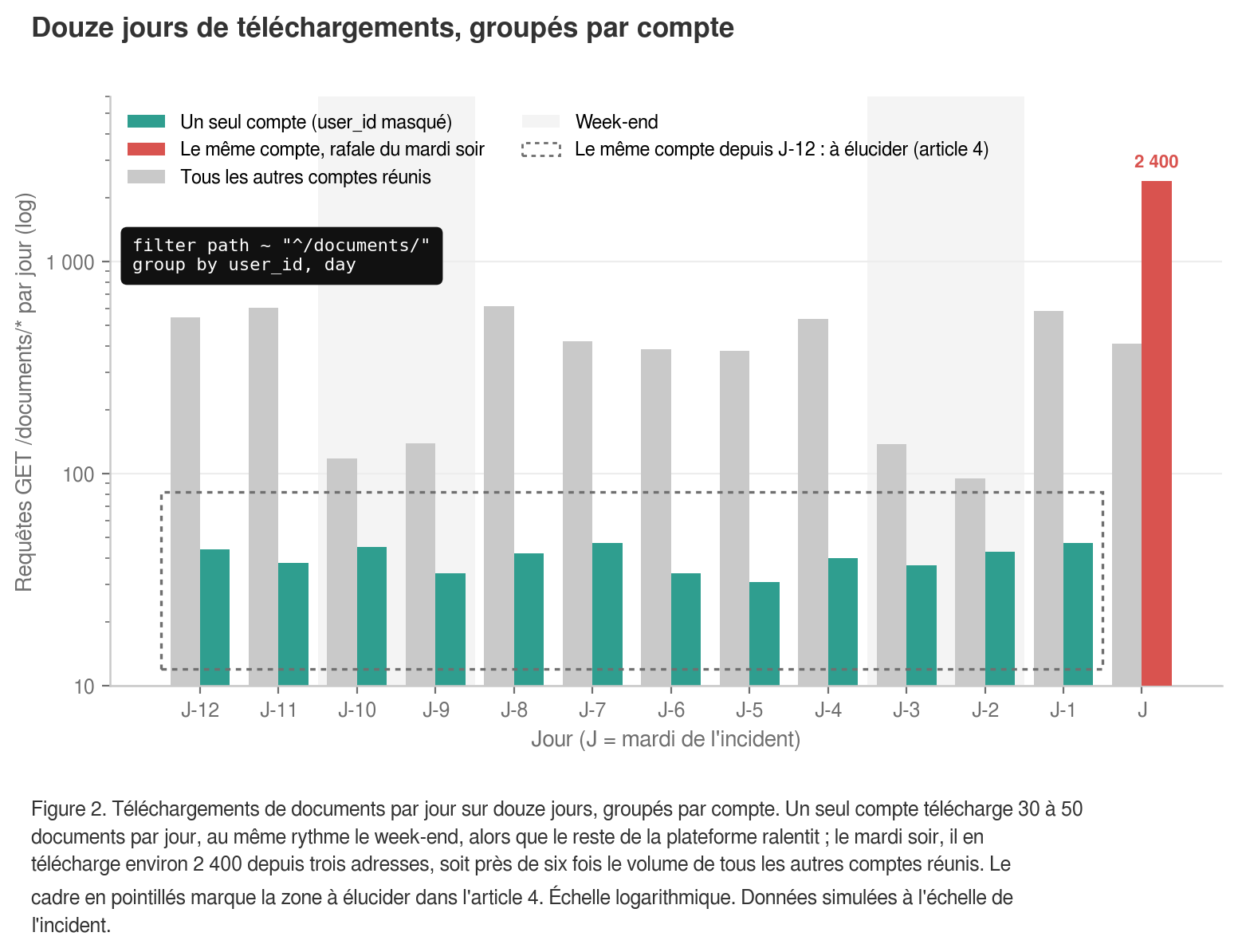
Let's go back to the query grouped by user_id, extended over twelve days (figure 2).
It shows a regularity that doesn't resemble any usage pattern I'm familiar with. For twelve days, a few dozen downloads per day, at roughly the same pace, with no weekend breaks. Then, on Tuesday at 9:48 PM, a burst: thousands of documents in the evening, from three different addresses. And from the first day to the very last minute, it is the same account doing the downloading.
The question that opens the next article: is this account being used by its owner?
In a nutshell
We moved from the log line to the number, then from the number to the curve. Each step required a tool, and each tool required the logs to be usable, which is the work covered in the previous article. If you are starting from scratch, begin with centralization: search, charts, and alerts all rely on it.
We now know how many. The remaining question is whether it's normal: next episode, comparing a behavior to its own baseline.
— Inès, Information Systems Security Manager at Capsens
To learn more
- Logging under DORA: Article 12 of Delegated Regulation (EU) 2024/1774, EUR-Lex
- Default standard output logging: template
production.rbin Rails 7.2 and current version - Queue depth and latency: Sidekiq API, official wiki
- Dead set,
dead_max_jobsanddead_timeout_in_seconds: Error Handling, Sidekiq wiki - Declaring and consuming queues: Advanced Options, Sidekiq wiki
- Structured single-line request logs: Lograge, repository and README
- Format
combinedaccess logs: modulengx_http_log_module, nginx documentation - Processor and processing register: Articles 28 and 30 of the GDPR, EUR-Lex
- Log retention period: CNIL recommendation on logging