Related articles

🍪 🔄 Synchronize your CRM from Rails with etlify

For one of our clients who offers an online investment platform, the sales team works from Airtable. It is their daily tool for tracking users, investments and financial movements. Except that the source data lives in the Rails app. So you have to push the data from Rails to Airtable, and keep it up to date.
At the beginning, we synchronized a model. Then two. Then five. Each model had its own worker, its serializer, its transaction, its specs. Six to eight files to create for each new synchronized model. Twenty-four files dedicated only to sync. And when it broke, the periodic synchronization went on again without correcting the problem, and the errors polluted Appsignal, our monitoring tool.
The real problem was not the existing code. It was the question: “How long does it take to add a sixth model?” Answer: half a day, wiring the callbacks, copying and pasting the digest logic, praying not to forget anything.
We first looked for existing gems. Most targeted a specific CRM (HubSpot, Salesforce) or required a strong connection with ActiveRecord. Nothing that fits our needs: a declarative system, agnostic of CRM, capable of managing dependencies between models.
We decided to write our own gem. The initial idea: to make CRM sync as easy as a Has_Many Or a Validates. Declare in the model what we sync, how we transform it, and let the gem handle the rest.
A few months later, we Etlify, an open source Rails gem created by Capsens. The name comes from the acronym ETL: Eextract, Ttransform, LRoad. That's exactly what the gem does: extract data from ActiveRecord, transform it via a serializer, and load it into the CRM.
What we have gained
Before we get into the code, here are the numbers measured on our migration:
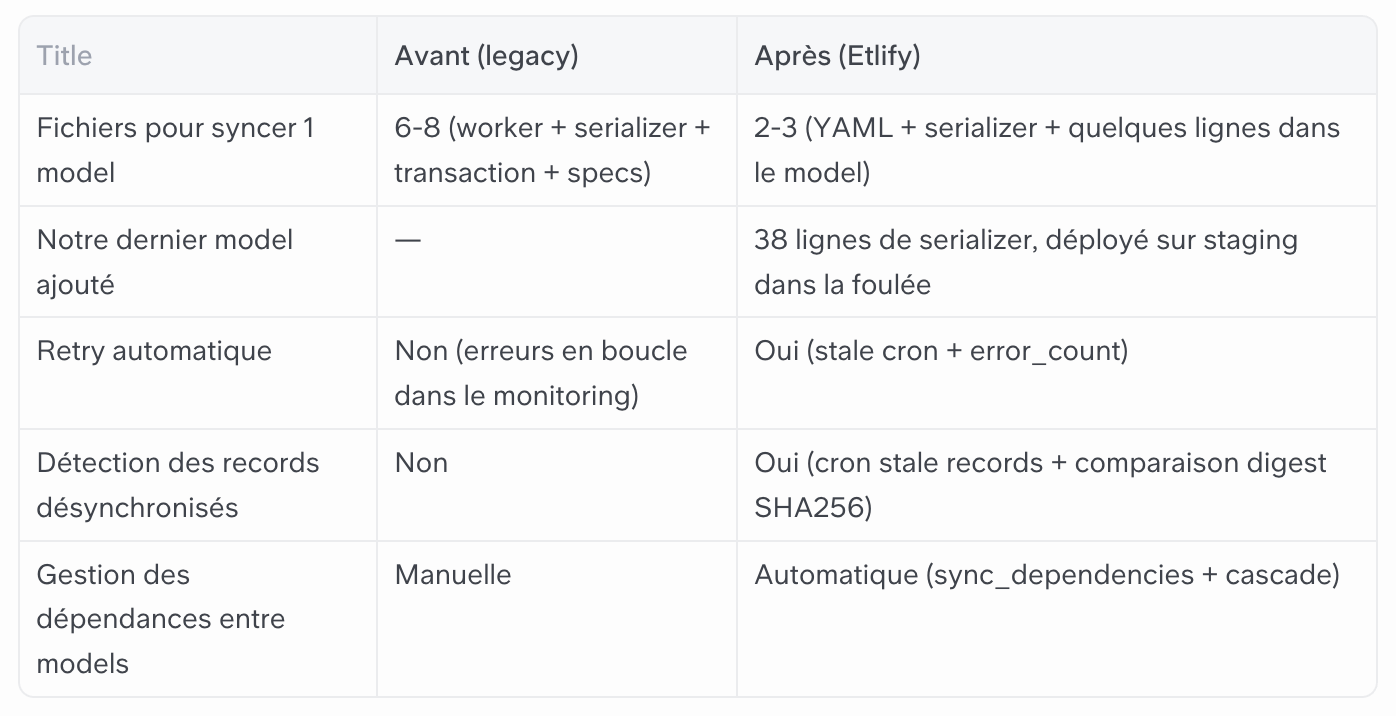
Architecture in 30 seconds
Etlify is based on four bricks, which follow ETL logic.
Extract: the detection of stale records Periodically scan your models to detect records whose digests have changed without an explicit call, and restart their synchronization.
Transform: the serializer (called Dictionary in the gem) transforms an ActiveRecord record into a CRM-compatible Hash. One per synchronized model.
Load: the synchronizer orchestrate the load. It calculates an SHA256 payload fingerprint. If nothing has changed, it passes. If not he calls Adapt it (the HTTP layer to the CRM) and stores the result in crm_synchronizations.
crm_sync! → Worker (async) → Synchronizer
  ├── sync_if → false ?        → :skipped
  ├── dependency manquante ?   → PendingSync → :buffered
  ├── digest identique ?       → :not_modified
  └── Serializer#to_h → Adapter#upsert! → :synced
The worker, the adapter, and the synchronizer are shared between all models. You only write what is specific: the serializer and the config.
Implementation
Installation
Add the gem to your Gemfile, with faraday (HTTP), Sidekiq-Throttled (rate limiting) and Sidekiq-unique-jobs (job dedup) if it's not already done:
gem “etlify”, git: "git@github.com:capsens/etlify.git”, tag: “v0.9.3"
Then:
Bundle Install
Before starting the migrations, create the initializer for the gem to be configured:
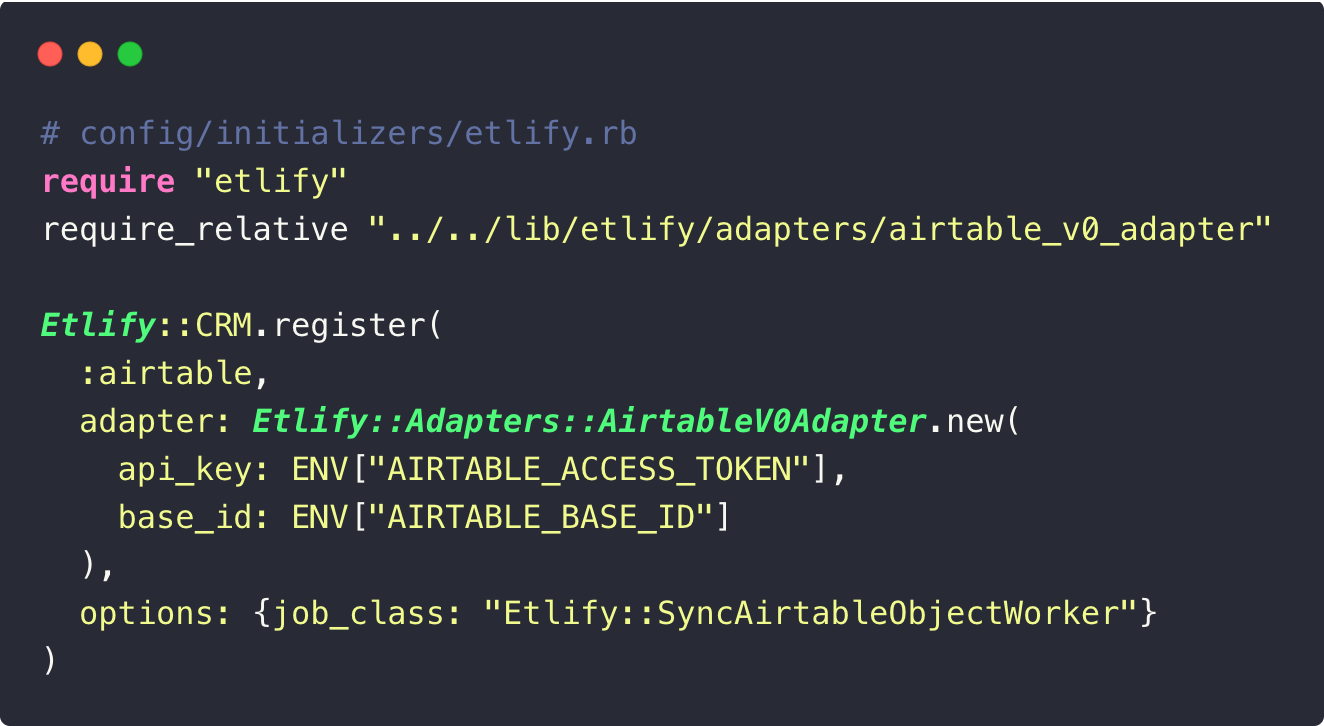
Then, generate and launch the migrations:
rails g etlify:migration create_crm_synchronisations
rails g etlify:migration create_etlify_pending_syncs
rails db:migrate
crm_synchronizations stores for each synchronized record:
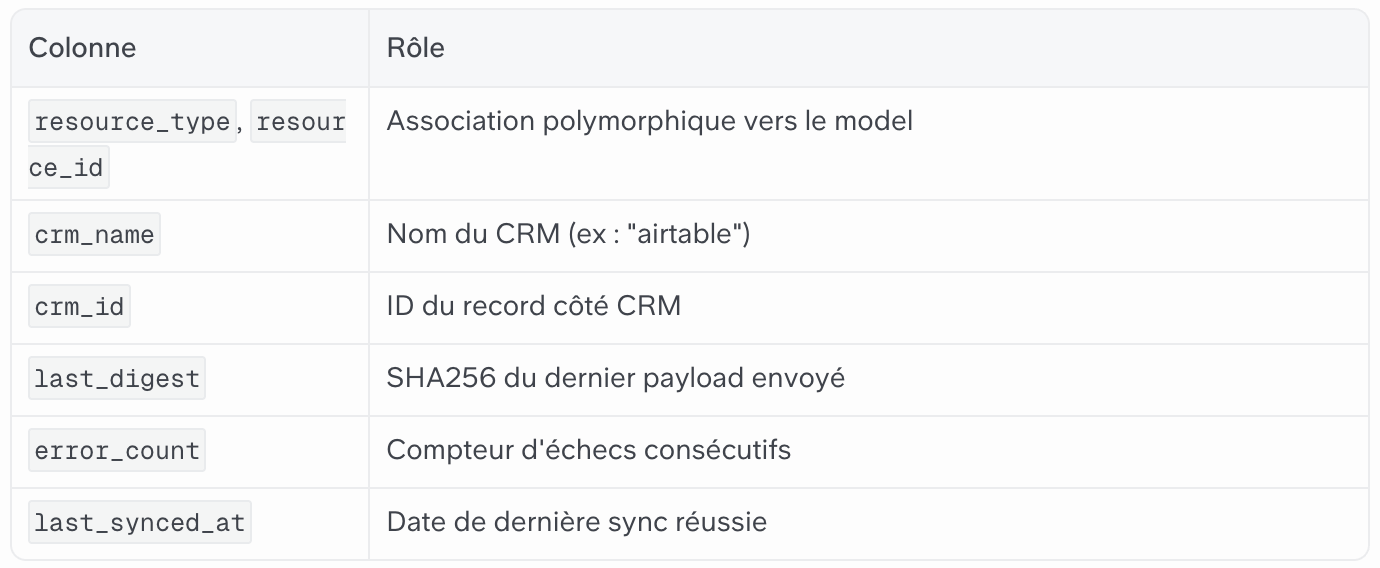
etlify_pending_syncs keep syncs blocked by a dependency (we'll come back to that).
Adapt it
The gem provides the contract. Adapting it is you who write it. Here is ours for Airtable:
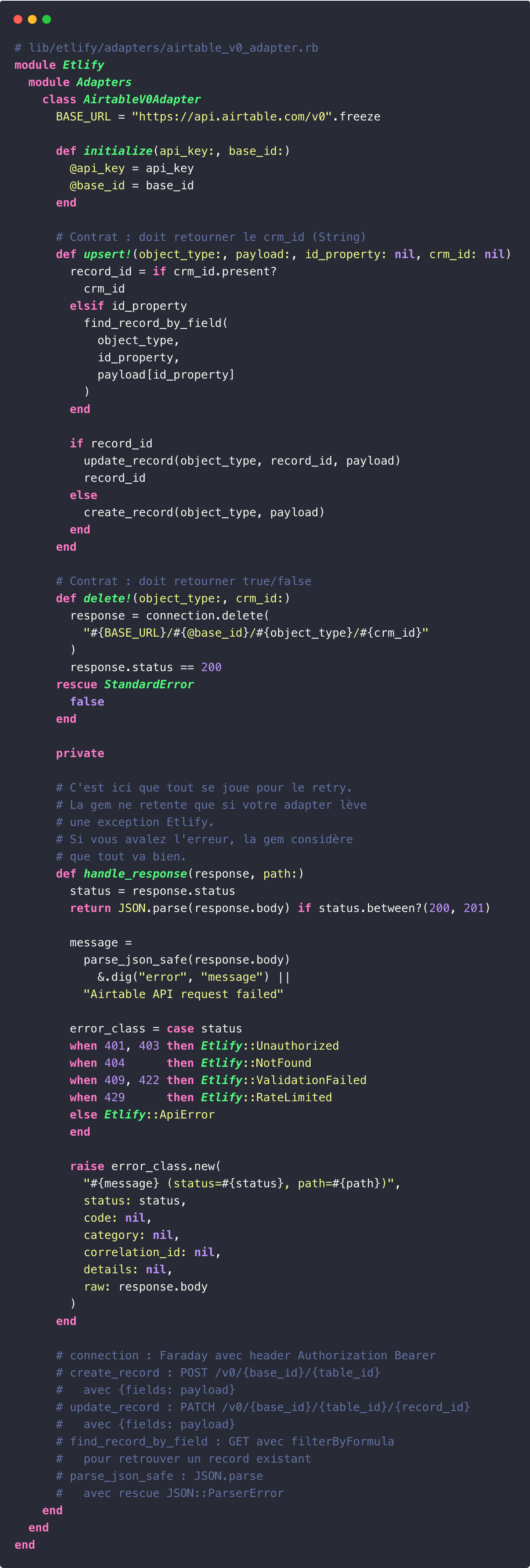
Upsert! Turn it over CRM_ID. Delete! returns a boolean. The private CRUD methods are classic Faraday (POST to create, PATCH to update, GET with FilterByFormula to search for an existing record).
Important point: the gem does not trigger steps Delete! upon After_destroy. If you delete a record in the database, the record on the CRM side remains. It's up to you to decide where and when to call Delete! explicitly.
For another CRM, implement Upsert!, Delete! and the error mapping in Handle_Response. The rest changes, the mechanics remain the same.
The YAML configuration
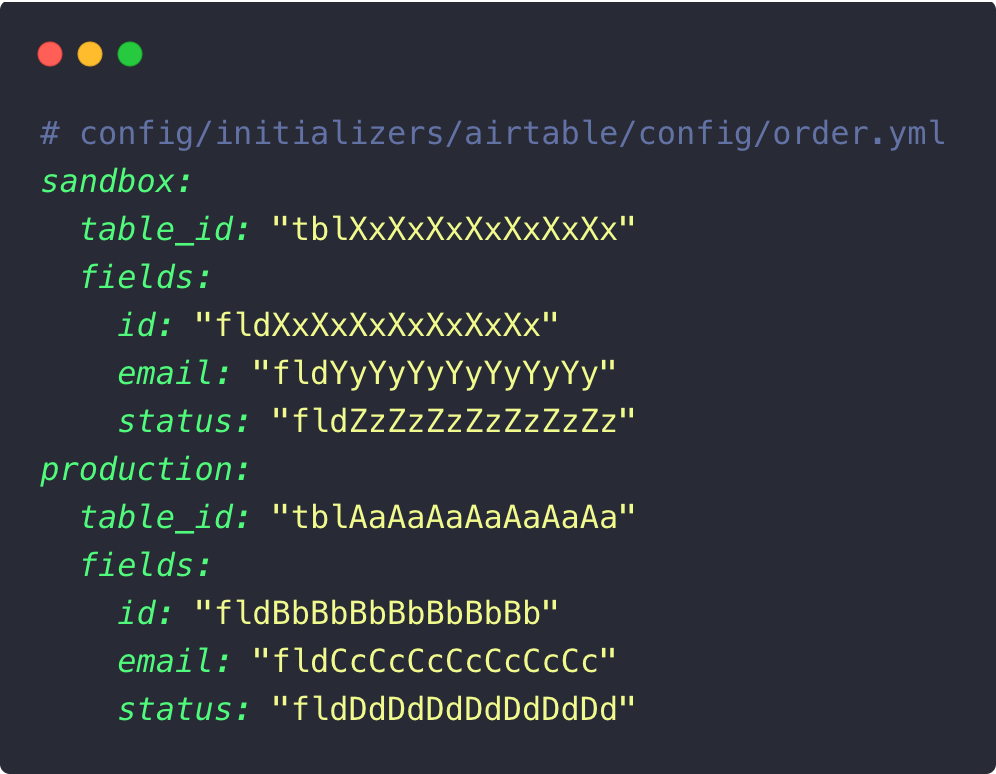
Each model has its own YAML file. The idea is to decouple your field names from Airtable IDs. A renamed field on the CRM side? You're changing the YAML, not the code.
Declare a synchronizable model
Two things to add to the model: include Etlify: :Model for DSL, and has_many:crm_synchronizations for the polymorphic association.
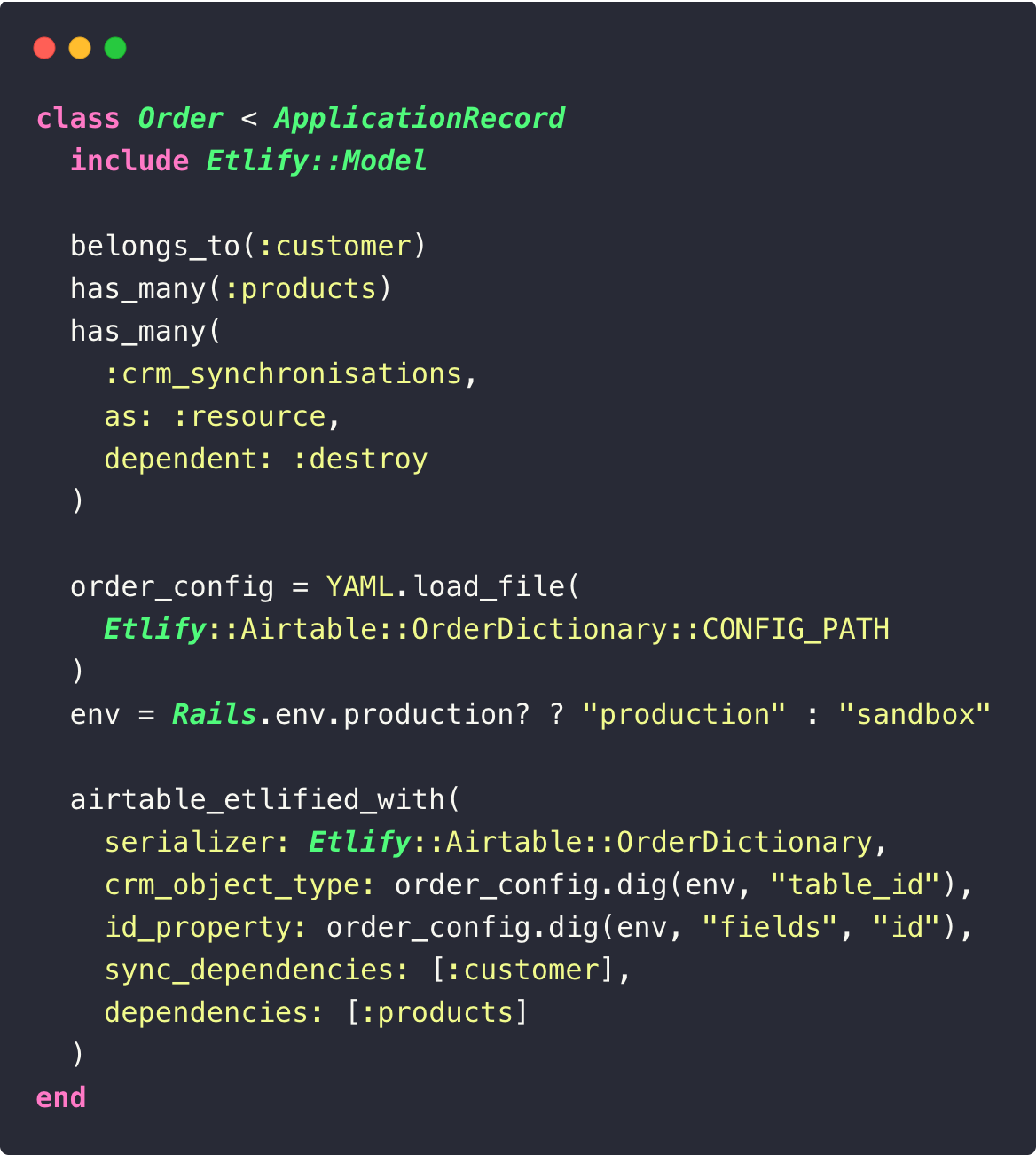
The YAML is loaded at boot time via the constant CONFIG_PATH of the serializer, only one place where the path is defined. CRM_Object_Type receives the ID table. id_property is used to find an existing record on the CRM side.
There are four options in DSL that are worth considering. It took us a while to fully identify them.
sync_dependencies: [:customer] is blocking. If the Customer does not have CRM_ID, the sync is put on hold. One PendingSync is created. Etlify triggers the cascading Customer sync. When this one is synchronized, the pending syncs will be executed.
dependencies: [:products] is non-blocking. The Order serializer includes Product data (e.g. their name, price). If a Product changes, the SHA256 digest of the Order also changes at the next calculation. The stale records cron detects this difference and re-syncs the Order automatically.
sync_if filter eligible records. If the Lambda returns False, the synchronizer returns :skipped and don't touch the CRM. Attention: a record that is already synchronized including the sync_if Then go back False will not be re-synced or deleted on the CRM side. This means that if a record changes state (for example, it becomes ineligible again), it will remain as it is on the CRM side. To pick it up, call Delete! explicitly. To be used with discernment, on truly definitive states.
Stale_Scope Restrict the cron scan to the records concerned.
The waterfall works in depth. Imagine: Order → Customer → Company. Etlify puts on hold and goes up the channel until you find a CRM_ID. If it reminds you of Russian dolls, that's normal.
The serializer
The serializer is the file where you decide what the CRM sees from your data. First, the base class:
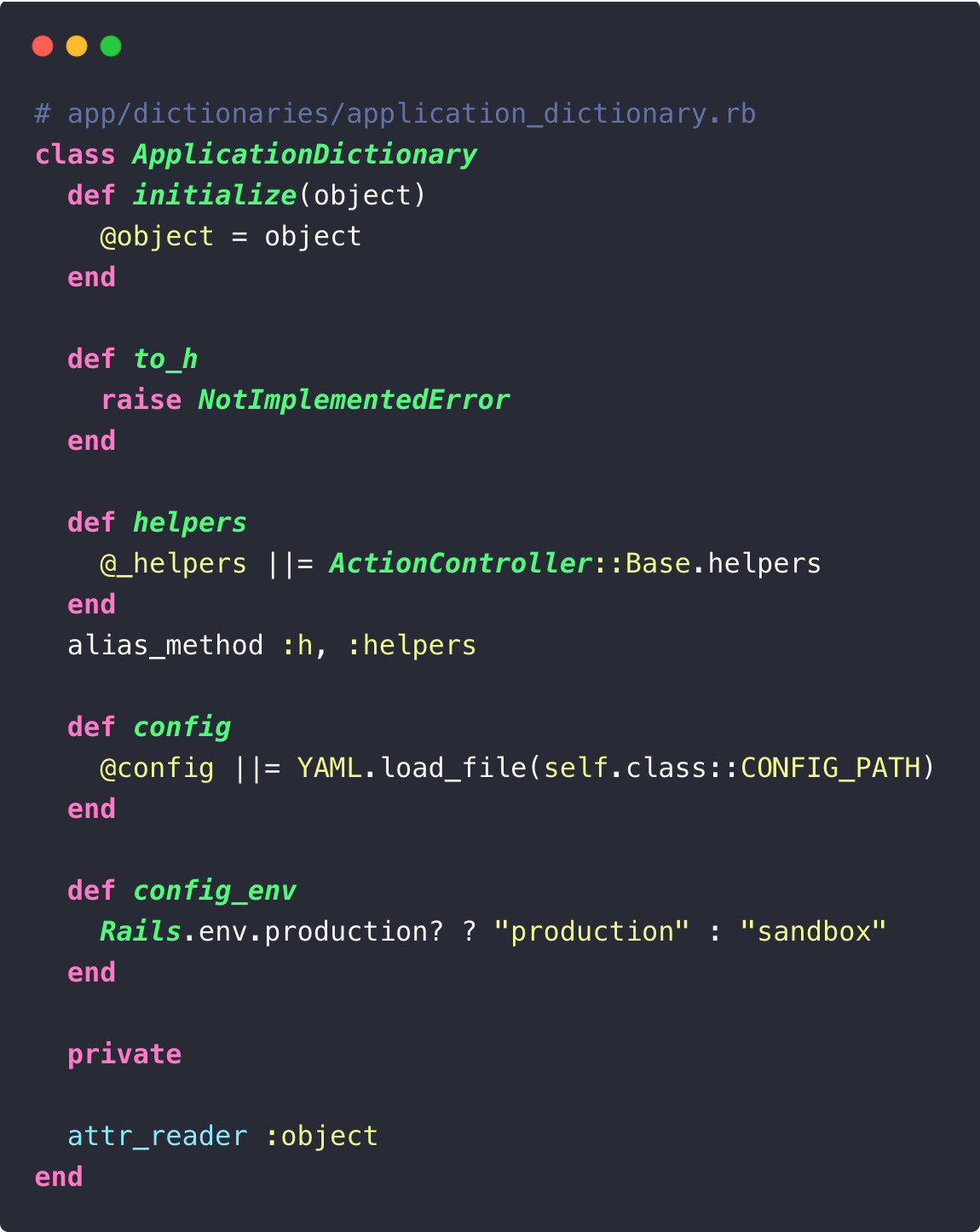
The Helpers/hr gives access to Rails helpers (h.number_to_currency, H.Truncate, etc.) directly into your serializers. It helps out more often than you think.
Then the model serializer:
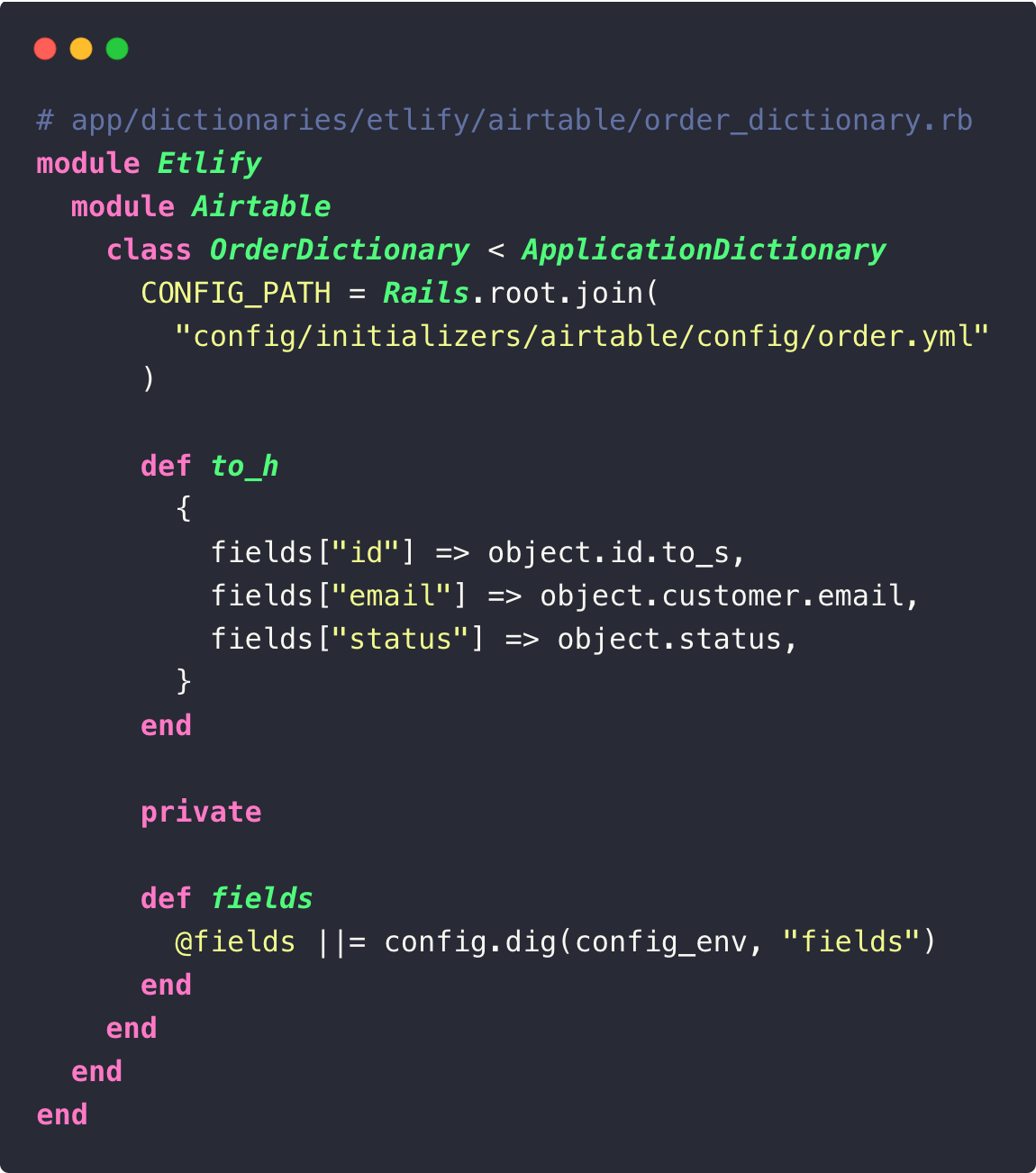
The keys of the Hash returned by To_h are Airtable field IDs, not your column names. One serializer per synchronized model.
The worker
The model knows what, the serializer knows how. All that's left is transport. The gem provides a Etlify: :syncJob by default. Here we are replacing it with a Sidekiq worker with throttling to respect Airtable limits:
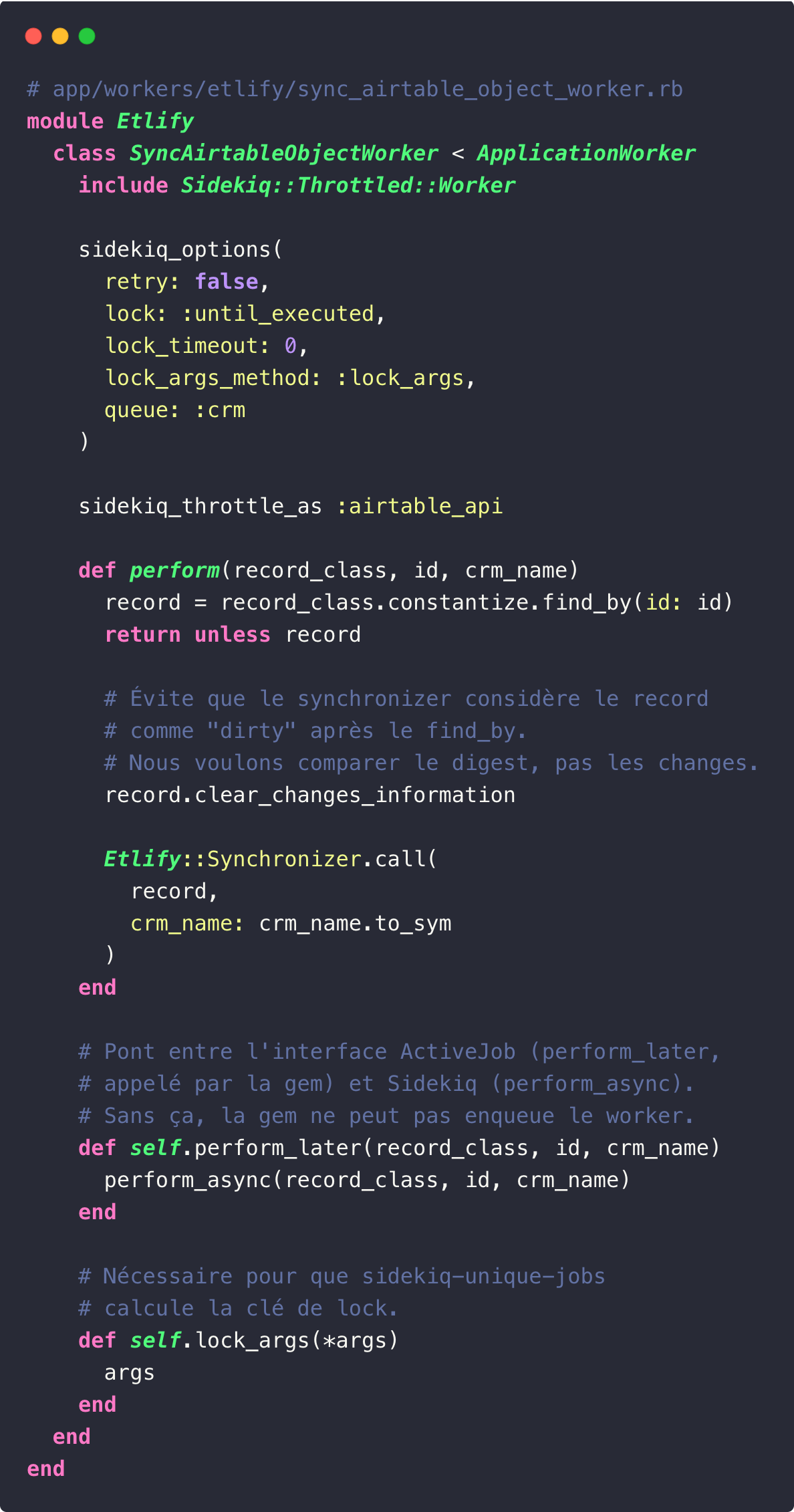
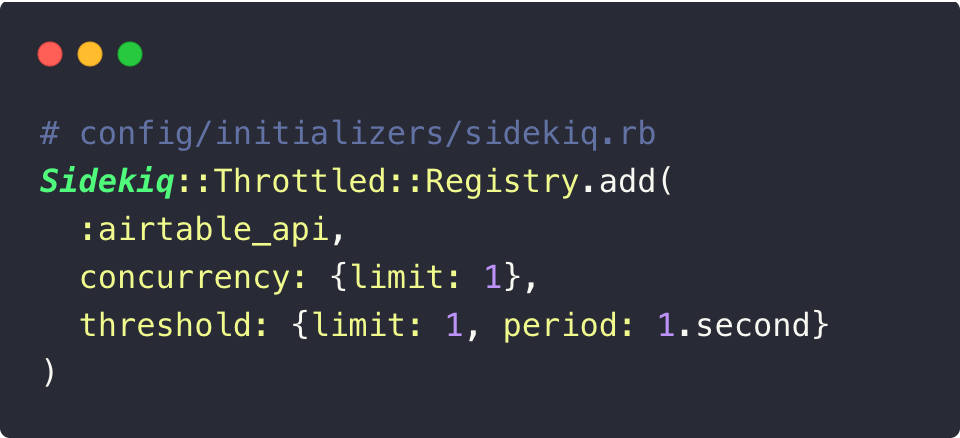
The throttle :airtable_api should be declared in your Sidekiq initializer:
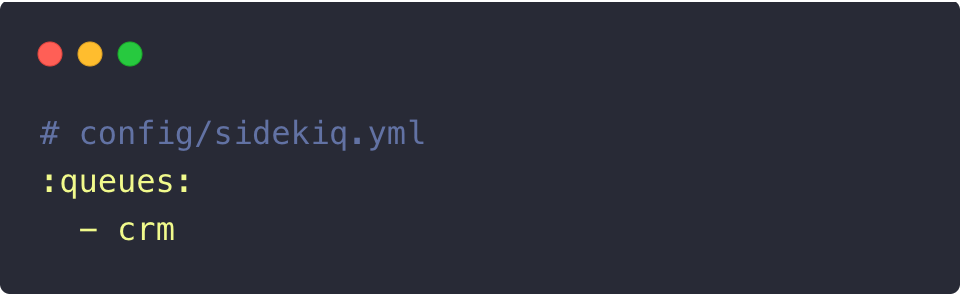
And the queue crm in your configuration:
The worker has retry: false Sidekiq side. The synchronizer only makes one attempt per invocation: if it fails, it increments error_count within crm_synchronizations and move on to the next one. No retry in a loop, it's the cron of the Stale Records that makes up for it in the next cycle. After 3 consecutive failures (configurable via max_sync_errors), the record is excluded from the automatic cron. It can still be synchronized manually via crm_sync!. A successful call hands error_count to zero.
In addition, a cron worker catches up with records whose digest has changed without an explicit call:
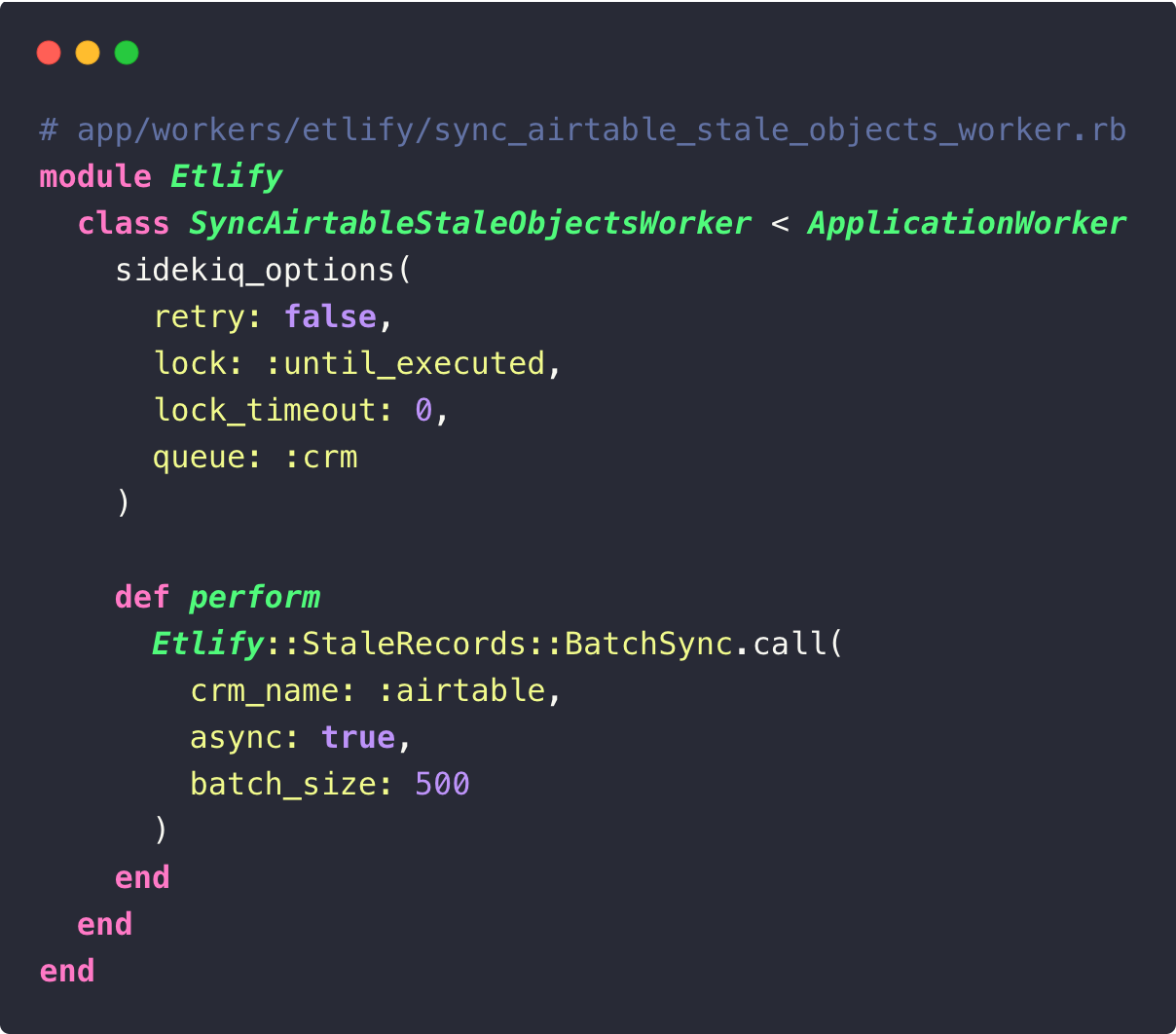
Plan it in your config/schedule.yml at the frequency that's convenient for you.
Trigger sync
Everything is in place. To sync a record: order.crm_sync! (crm_name: :airtable). A one-liner from your services, transactions or controllers. We call him after a validated payment, in our membership transactions, in the onboarding services. The synchronizer takes care of the rest.
Migrating from a legacy system
If your models had a column airtable_id, add a fallback:
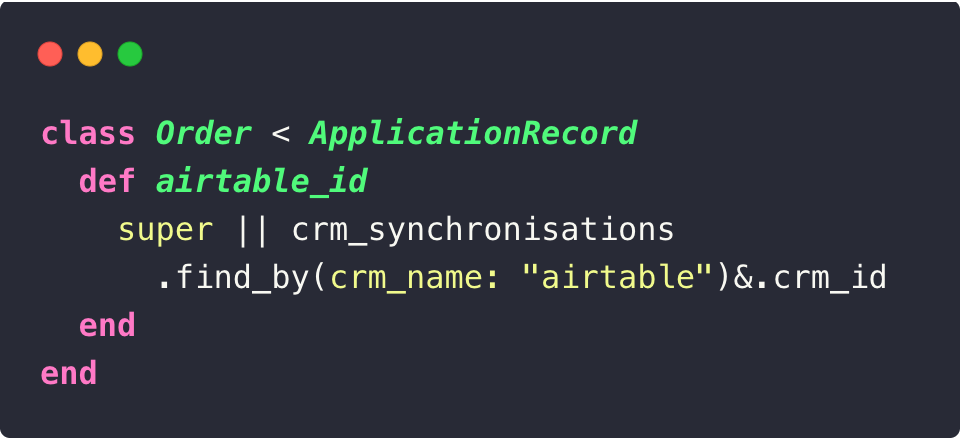
The two systems coexist. You are migrating model by model.
To avoid re-syncing all your records via the API, a rake task creates CRM Synchronization en masse from airtable_id existing:
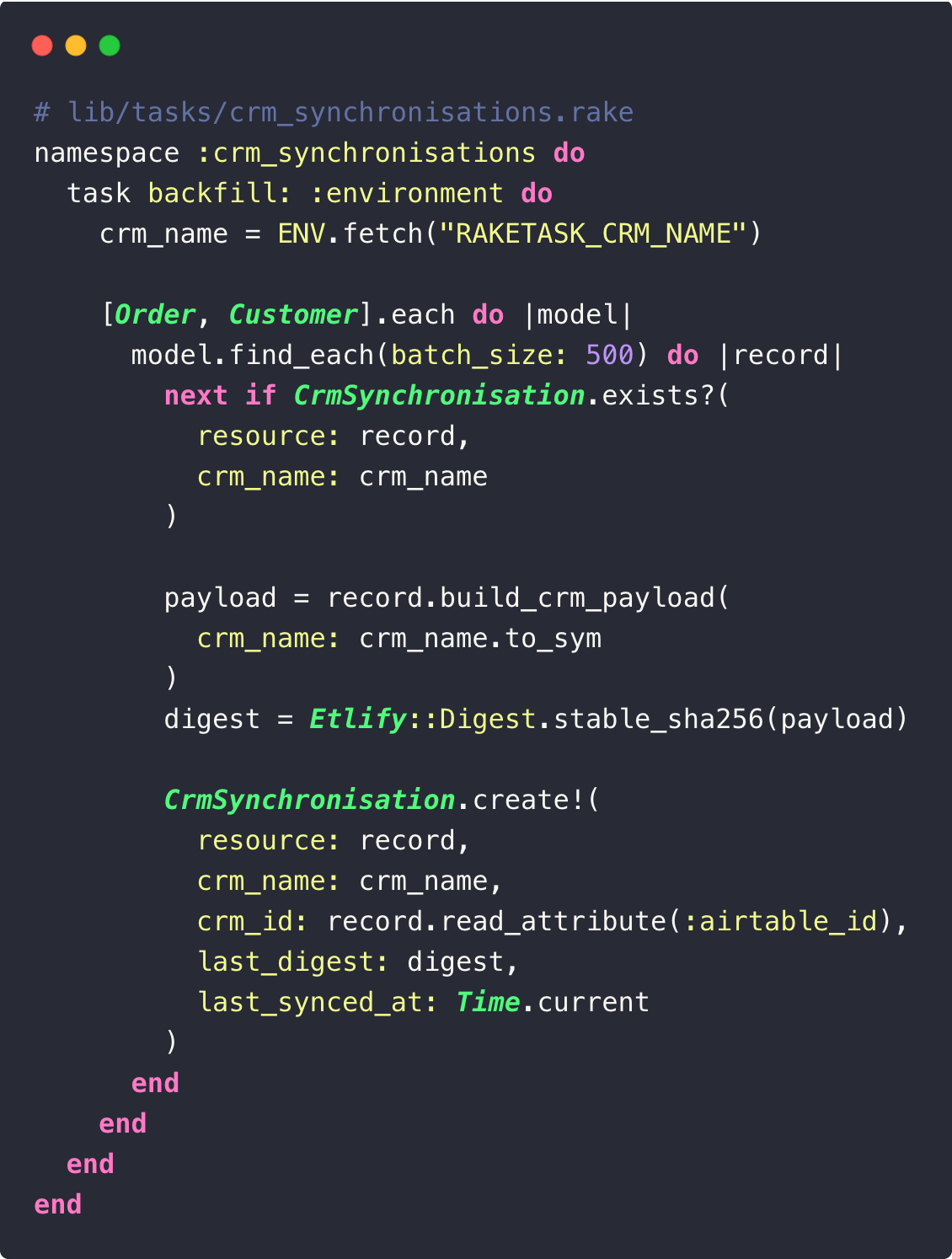
The task stores the current fingerprint. Only records changed after the backfill will be re-synced. No API flood.
Tests
For your tests, mock the HTTP calls to Airtable rather than replacing the adapter. This makes it possible to test true behavior end-to-end, including your Handle_Response and the error mapping:
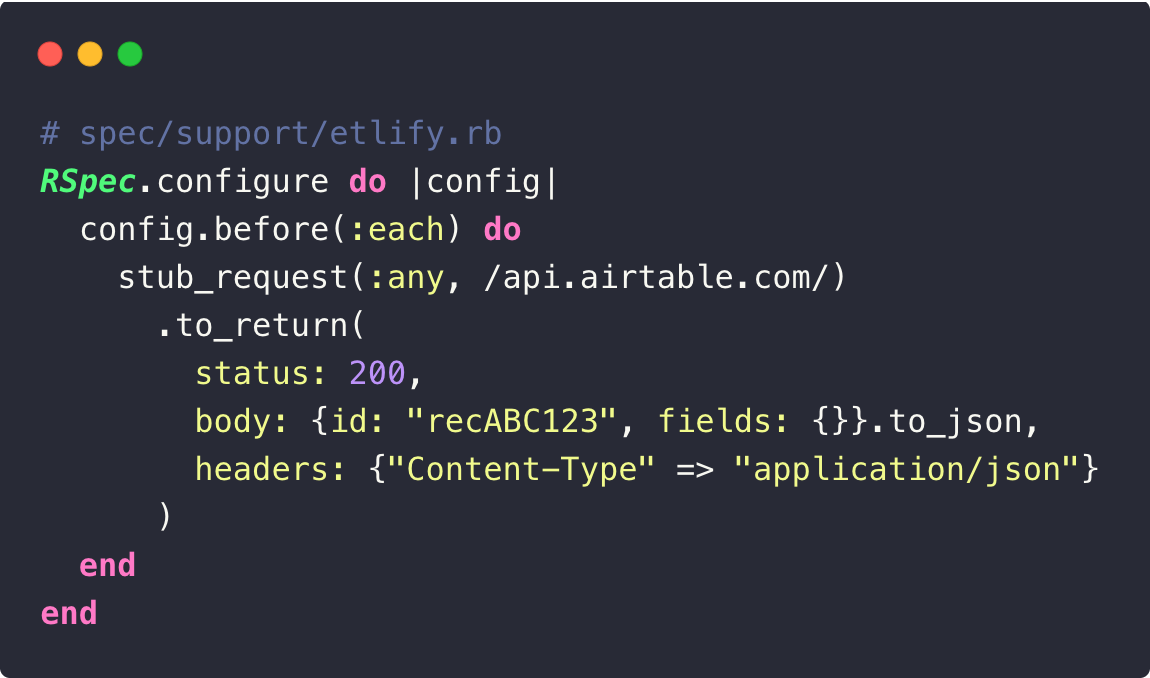
Then test your serializers and sync behavior:
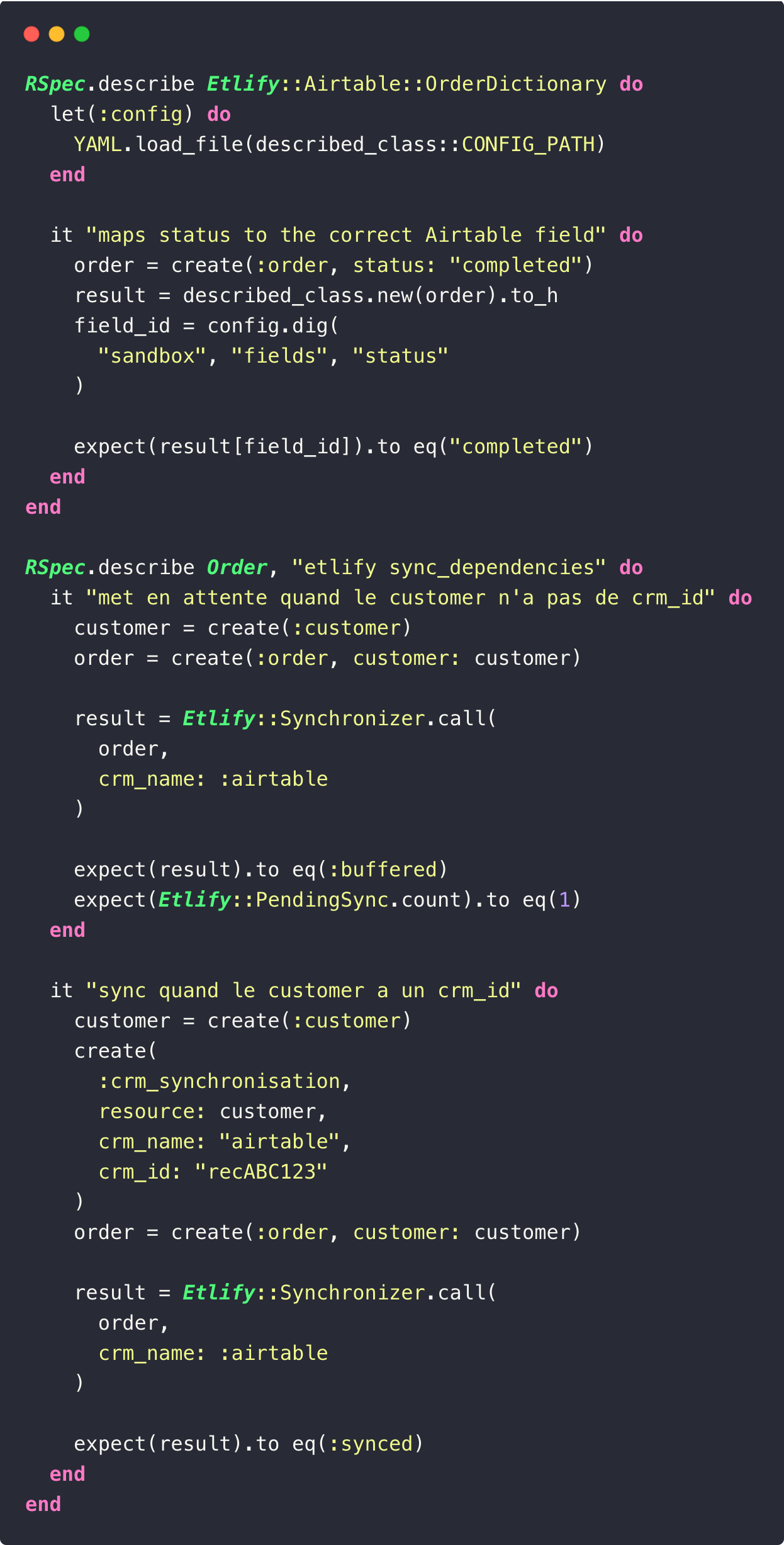
Etlify is not limited to Airtable. The adaptive architecture makes it possible to connect any CRM. The gem includes a NullAdapter for your tests and local development. If you use ActiveAdmin, the tables crm_synchronizations and etlify_pending_syncs plug in very well to monitor your syncs and relaunch erroneous records.
If you're syncing a CRM from Rails and it's starting to get boring, give it a try. We would have liked to have had it sooner.
The gem is open source: github.com/capsens/ETLIFY